
In a world where data has become the lifeblood of businesses and individuals alike, finding a reliable and scalable solution for storage is crucial. From countless documents and cherished memories to invaluable resources and sensitive information, our digital archives are growing at an unprecedented pace. It’s time to explore the ultimate saviour that promises unparalleled reliability, capacity, and versatility – introducing Blu-ray as the game-changing solution for all your data storage needs. Buckle up as we delve into why this dynamic technology is set to revolutionise how we preserve, protect, and access our digital treasures like never before!
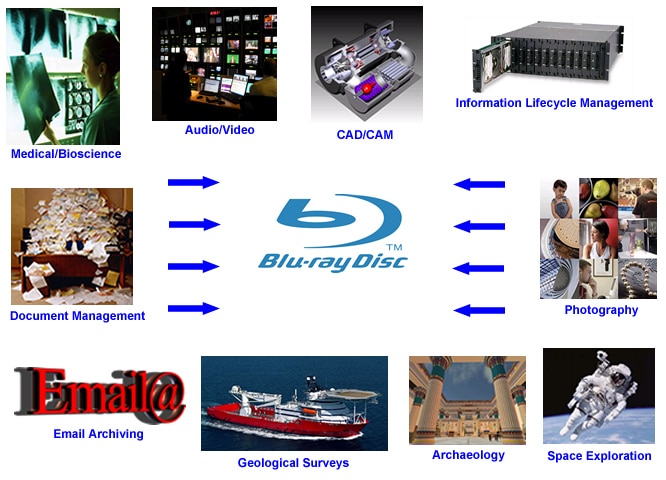
There are many benefits of using Blu-ray discs for data storage, including:
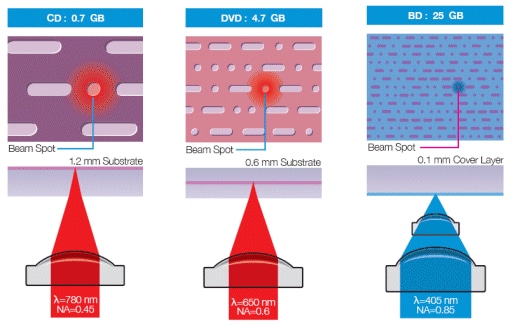
When data is written to a Blu-ray, it is first converted into very small pits and lands. These tiny features are then engraved into the surface of the disc. The Blu-ray player shines a laser onto the disc, which reads the pits and lands and converts them back into digital data that can be played on your screen.
The advantage of this method of storage is that it can hold a huge amount of data in a very small space. A single Blu-ray disc can hold up to 128 GB of data, which is equivalent to around 30 hours of HD video or 300,000 music tracks.
There are many different types of data storage solutions on the market today. It can be hard to decide which one is right for you and your needs. Here, we will compare some of the most popular options: HDD (hard disk drive), SSD (solid state drive), and Blu-ray.
HDD: HDD is the most common type of data storage. It uses spinning disks to store data. HDD is typically cheaper than other options, but it is also slower and uses more power.
SSD: SSD is a newer technology that uses flash memory to store data. SSDs are much faster than HDDs, but they are also more expensive.
Blu-ray: Blu-ray is a high-capacity optical disc format that can store large amounts of data. Blu-ray discs are more expensive than HDDs or SSDs, but they offer a longer lifespan and higher capacity.
As the cost of Blu-ray discs continues to drop, many businesses are turning to them for data storage. Here are some tips for getting the most out of your Blu-ray discs:
There are a few potential drawbacks to using Blu-rays for data storage. First, Blu-ray discs are more expensive than most other storage options. Second, they are less compatible with some devices and operating systems but if they are written using UDF 2.x the BD Discs can be read by a PC with a Blu-ray reader.
Whether you have already adopted Blu-ray discs for data storage or not, it is apparent that this technology offers numerous advantages. It provides an extremely reliable medium to store your files, videos, music and photos in one place with fantastic long-term reliability. As a bonus, Blu-ray also allows viewers to enjoy high quality HD audio and video making it ideal for entertainment on the go or at home. With the cost of Blu-rays decreasing over time as well as their durability increasing – they are quickly becoming one of the best solutions for digital archiving needs!